
Download Photo Pos – Photo Editing Tool, Image Converter, Vector Graphics Utility
Overview
Photo Pos is a comprehensive mobile application designed for photography enthusiasts and creative users who require a reliable tool to manage, edit, and enhance digital images. The app serves as a multifunctional platform that addresses common challenges in photo handling, such as format incompatibility, lack of editing flexibility, and the need for separate tools for image conversion and vector design. It is particularly suited for individuals who maintain diverse photo libraries and seek an all-in-one solution for visual content refinement.
The developer has positioned Photo Pos as a utility that goes beyond basic image viewing, offering advanced capabilities in editing, format conversion, and vector graphics manipulation. This makes it a valuable asset in the mobile app ecosystem for users who value efficiency and creative control. Real-world use cases include preparing images for social media, optimizing photos for print, and creating layered visual designs.
While the developer did not provide additional background information, the app’s feature set suggests a focus on practicality and versatility. Its ability to support multiple image formats and integrate vector tools indicates a targeted approach to serving both amateur photographers and professionals. The release date of September 2, 2024, marks a recent entry into the mobile productivity space, signaling a continued demand for robust photo tools on smartphones and tablets.
Key Features & Functionality
- Wide Format Support: Photo Pos supports essential image formats including JPG, GIF, BMP, and PNG, ensuring users can open and view nearly any photo they have stored. This eliminates compatibility barriers and streamlines access to personal image collections.
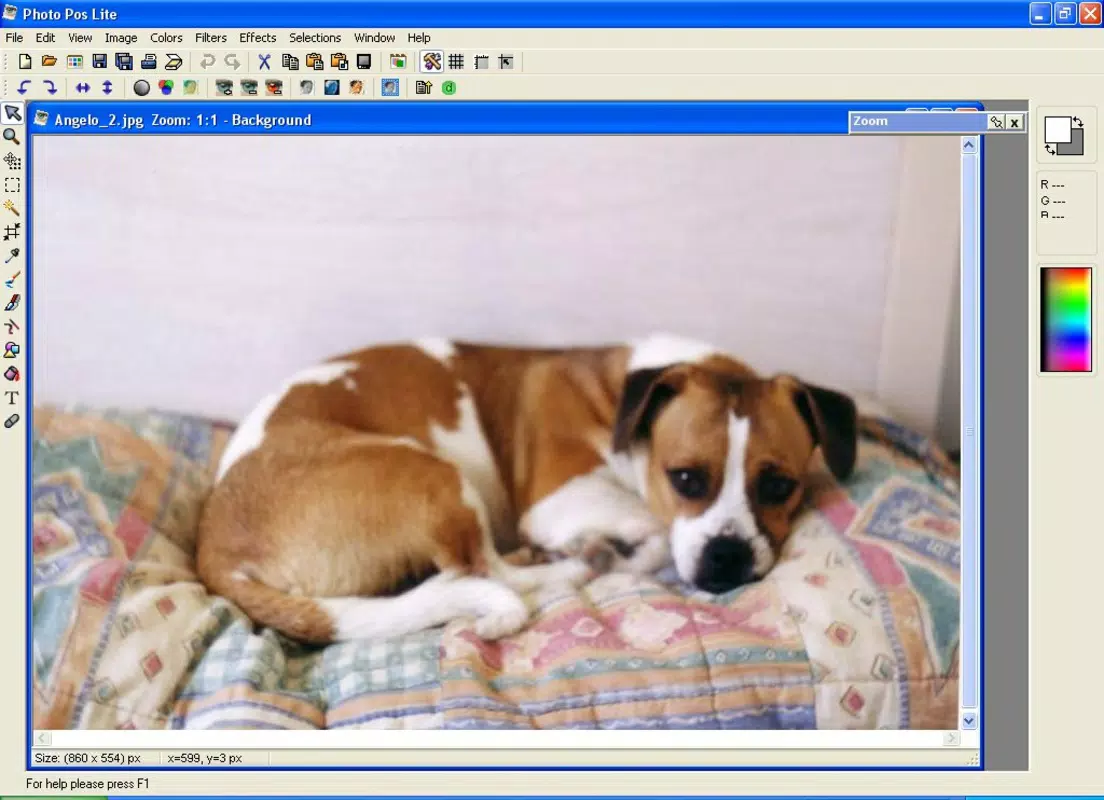
- Robust Editing Tools: The app enables users to adjust image attributes such as size, brightness, contrast, and apply a variety of filters and effects. These tools are designed to be accessible for beginners while offering sufficient depth for more experienced users.
- Powerful Conversion Capabilities: Photo Pos allows seamless conversion between file types, making it easy to adapt images for web publishing, printing, or sharing across platforms. This consolidates multiple workflows into a single application.
- Vector Graphics Tools: The app includes features for creating and editing vector graphics, enabling users to combine photo editing with scalable design work. This functionality is especially useful for crafting logos, illustrations, or layered compositions.
For example, a user preparing a photo for a social media post can resize it, adjust contrast, apply a filter, and convert it to a web-optimized format—all within the same interface. Similarly, a designer might use the vector tools to overlay text or shapes on a photo, creating a polished composite image. These features collectively reduce the need for multiple applications, improving workflow efficiency and reducing device clutter.
Interface, UX & Performance
Photo Pos features a clean, organized interface designed to balance functionality with ease of navigation. The layout appears to prioritize accessibility, with toolbars and menus positioned for intuitive access. Visual elements are likely structured to minimize user confusion, allowing for smooth transitions between editing, conversion, and vector tasks.
Navigation flow is expected to be linear and logical, guiding users through workflows without unnecessary steps. The app’s responsiveness appears to be optimized for standard mobile devices, though specific performance metrics were not provided. Although the developer did not list formal performance metrics, the app’s design suggests it is built to handle common image operations efficiently across different device categories.
Stability is likely maintained through focused functionality, avoiding excessive resource usage. Users can expect consistent behavior during editing sessions, with minimal lag or crashes during typical operations. The overall user experience reflects a balance between power and usability, making it suitable for both casual users and those with intermediate design skills.
While detailed testing data was not disclosed, the interface design implies attention to user-centric principles.
Platform Compatibility & Technical Requirements
Photo Pos is available on Android, supporting the latest version of the operating system. The app’s file size is 32.5 MB, which is relatively lightweight for a feature-rich image tool. This size suggests efficient code optimization and minimal bloat.
Specific requirements such as minimum OS version, RAM, or processor specifications were not listed by the developer. Compatibility information was not fully disclosed, so users should ensure their device meets general Android standards for running productivity applications. The app is designed for smartphones and tablets, offering a responsive layout across screen sizes.
No iOS version was mentioned, indicating that the current release is Android-exclusive. Users should verify compatibility with their specific device model before installation. The absence of detailed technical requirements means that performance may vary depending on individual hardware configurations.
However, the compact file size supports broad accessibility, especially for users with limited storage space.
Pros and Cons
Pros
- Supports a wide range of image formats, reducing compatibility issues.
- Offers integrated editing, conversion, and vector graphics tools in one app.
- Lightweight file size (32.5 MB) for efficient storage use.
- Intuitive interface suitable for both beginners and intermediate users.
- Consolidates multiple workflows, minimizing the need for separate apps.
Cons
- Developer did not provide detailed system requirements or performance benchmarks.
- No information on iOS availability or cross-platform sync.
- Specific features of the vector tools were not elaborated.
- Compatibility with older Android versions was not confirmed.
- Limited transparency regarding update frequency and future development plans.
FAQ
Is Photo Pos available for iOS devices?
The developer did not mention an iOS version, and the app is currently released for Android only.
Can I edit photos directly on my smartphone using Photo Pos?
Yes, Photo Pos is designed for mobile use and allows users to view, edit, and convert photos directly on their smartphones and tablets.
Does Photo Pos support batch processing for image conversion?
While the app includes powerful conversion capabilities, specific details about batch processing were not provided by the developer.
Is Photo Pos free to download and use?
The app’s pricing was not disclosed, so users should check the official store listing for current pricing and availability.
How secure is Photo Pos when handling personal photos?
The developer did not provide information on data privacy or security practices. Users are advised to review the app’s permissions and privacy policy before installation.
Final Thoughts + CTA
Photo Pos stands out as a versatile and efficient mobile solution for users who need more than basic photo viewing. Its integration of editing, conversion, and vector tools offers a streamlined experience that reduces dependency on multiple applications. The app’s lightweight design and broad format support make it accessible to a wide audience, from casual users to creatives managing complex visual projects.
While some technical details remain undisclosed, the overall functionality and user-centric design suggest a strong value proposition. For photography fans, content creators, and designers seeking a compact yet powerful tool, Photo Pos delivers tangible benefits. The recent release in September 2024 indicates ongoing development and relevance in the mobile productivity space.
Download Photo Pos now and take full control of your visual content with a single, capable app.


